También se ha actualizado con una nueva versión de este gran emulador de MSX creado por Marat Fayzullin que permite el uso de ordenadores MSX, MSX2, and MSX2+,con gran compatibilidad en los juegos, uso de trucos y filtros gráficos para mejorar la imagen, también existe para Andróid en dos versiones gratis y una completa de pago.
Cambios en la nueva versión:
– Made replay save states approximately every 170ms.
– Added ability to browse through paused replay.
– During replay, press [UP] to pause or resume.
– When replay paused, press [LEFT] and [RIGHT] to browse.
– Press any other button to continue playing.
– Now cancelling replay if any key or button is pressed.
– Made WaitJoystick() exit when window closed.
Página oficial:
http://fms.komkon.org/fMSX/
Descarga de su página oficial la versión de Windows:
http://fms.komkon.org/fMSX/fMSX54-Windows-bin.zip
Descarga de su página oficial la versión de Linux:
http://fms.komkon.org/fMSX/fMSX54-Ubuntu-x86-bin.tgz
Android gratis:
https://play.google.com/store/apps/details?id=com.fms.fmsx
Andoid completa por 2.99 EUR :
https://play.google.com/store/apps/details?id=com.fms.fmsx.deluxe
Mostrando entradas con la etiqueta MSX. Mostrar todas las entradas
miércoles, 16 de mayo de 2018
miércoles, 28 de marzo de 2018
fMSX 5.3 para Windows y Linux
También se ha actualizado con una nueva versión de este gran emulador de MSX creado por Marat Fayzullin que permite el uso de ordenadores MSX, MSX2, and MSX2+,con gran compatibilidad en los juegos, uso de trucos y filtros gráficos para mejorar la imagen, también existe para Andróid en dos versiones gratis y una completa de pago.
Cambios en la nueva versión:
– Added remaining time display during replay.
– Stopping replay when emulation reset or state loaded.
– Fixed replay rollover mechanism.
– Added shadow underneath the time display.
– Compiled fMSX-Unix with -Wall and eliminated warnings.
– Replaced -DNO_WAVE_INTERPOLATION with -DWAVE_INTERPOLATION, off by default.
– Removed old LoadSTA() and SaveSTA() code.
– Finally deprecated -DNEW_STATES. .
Página oficial:
http://fms.komkon.org/fMSX/
Descarga de su página oficial la versión de Windows:
http://fms.komkon.org/fMSX/fMSX53-Windows-bin.zip
Descarga de su página oficial la versión de Linux:
http://fms.komkon.org/fMSX/fMSX53-Ubuntu-x86-bin.tgz
Android gratis:
https://play.google.com/store/apps/details?id=com.fms.fmsx
Cambios en la nueva versión:
– Added remaining time display during replay.
– Stopping replay when emulation reset or state loaded.
– Fixed replay rollover mechanism.
– Added shadow underneath the time display.
– Compiled fMSX-Unix with -Wall and eliminated warnings.
– Replaced -DNO_WAVE_INTERPOLATION with -DWAVE_INTERPOLATION, off by default.
– Removed old LoadSTA() and SaveSTA() code.
– Finally deprecated -DNEW_STATES. .
Página oficial:
http://fms.komkon.org/fMSX/
Descarga de su página oficial la versión de Windows:
http://fms.komkon.org/fMSX/fMSX53-Windows-bin.zip
Descarga de su página oficial la versión de Linux:
http://fms.komkon.org/fMSX/fMSX53-Ubuntu-x86-bin.tgz
Android gratis:
https://play.google.com/store/apps/details?id=com.fms.fmsx
miércoles, 12 de julio de 2017
fMSX 5.0 para Windows y Linux
También se ha actualizado con una nueva versión de este gran emulador de MSX creado por Marat Fayzullin que permite el uso de ordenadores MSX, MSX2, and MSX2+,con gran compatibilidad en los juegos, uso de trucos y filtros gráficos para mejorar la imagen, también existe para Andróid en dos versiones gratis y una completa de pago.
Cambios en la nueva versión:
- Cambaiiado a microsegundos la emulación del AY8910 PSG.
- Ahora se actualiza , hace el render y toca el sonido cada 8 scanlines
– La prueba del PLAY "S8M90O6G" MML funciona ahora...
– Añadido soporte para DirectInput joysticks al fMSX-Windows.
– Arreglado el fallo que rompia el emulador al cambiar el audio sampling rate en fMSX-Windows..
Página oficial:
http://fms.komkon.org/fMSX/
Descarga de su página oficial la versión de Windows:
http://fms.komkon.org/fMSX/fMSX50-Windows-bin.zip
Descarga de su página oficial la versión de Linux:
http://fms.komkon.org/fMSX/fMSX50-Ubuntu-x86-bin.tgz
Android gratis:
https://play.google.com/store/apps/details?id=com.fms.fmsx
Andoid completa por 2.99 EUR :
https://play.google.com/store/apps/details?id=com.fms.fmsx.deluxe
Cambios en la nueva versión:
- Cambaiiado a microsegundos la emulación del AY8910 PSG.
- Ahora se actualiza , hace el render y toca el sonido cada 8 scanlines
– La prueba del PLAY "S8M90O6G" MML funciona ahora...
– Añadido soporte para DirectInput joysticks al fMSX-Windows.
– Arreglado el fallo que rompia el emulador al cambiar el audio sampling rate en fMSX-Windows..
Página oficial:
http://fms.komkon.org/fMSX/
Descarga de su página oficial la versión de Windows:
http://fms.komkon.org/fMSX/fMSX50-Windows-bin.zip
Descarga de su página oficial la versión de Linux:
http://fms.komkon.org/fMSX/fMSX50-Ubuntu-x86-bin.tgz
Android gratis:
https://play.google.com/store/apps/details?id=com.fms.fmsx
Andoid completa por 2.99 EUR :
https://play.google.com/store/apps/details?id=com.fms.fmsx.deluxe
viernes, 17 de marzo de 2017
fMSX 4.9 para Windows y Linux
También se ha actualizado con una nueva versión de este gran emulador de MSX creado por Marat Fayzullin que permite el uso de ordenadores MSX, MSX2, and MSX2+,con gran compatibilidad en los juegos, uso de trucos y filtros gráficos para mejorar la imagen, también existe para Andróid en dos versiones gratis y una completa de pago.
Cambios en la nueva versión:
– Movida la configuración de controles al menu « Input » en fMSX-Windows.
– Añadido la opción « Draw 65% Frames » a fMSX-Windows.
– Arreglada la actualización de pantalla despues de cambiar el agoritmo de escalado en fMSX-Windows.
– Arreglada la opción « Force 4:3 Screen » en el modo de pantalla TEXT80.
– Arreglado « Load MSXDOS2 ROM » opción en fMSX-Windows.
– Arreglada « Hit MIDI Drums » opción en fMSX-Windows.
– Ahora la computación del volumen del MIDI se hace mediante el analisis de la forma de onda.
– Corregido el volumen de las baterias MIDI en laa emulaciónm de AY8910.
– Arreglado el click del teclado MIDI en fMSX-Windows.
Página oficial:
http://fms.komkon.org/fMSX/
Descarga de su página oficial la versión de Windows:
http://fms.komkon.org/fMSX/fMSX49-Windows-bin.zip
Descarga de su página oficial la versión de Linux:
http://fms.komkon.org/fMSX/fMSX49-Ubuntu-x86-bin.tgz
Android gratis:
https://play.google.com/store/apps/details?id=com.fms.fmsx
Andoid completa por 2.99 EUR :
https://play.google.com/store/apps/details?id=com.fms.fmsx.deluxe
Cambios en la nueva versión:
– Movida la configuración de controles al menu « Input » en fMSX-Windows.
– Añadido la opción « Draw 65% Frames » a fMSX-Windows.
– Arreglada la actualización de pantalla despues de cambiar el agoritmo de escalado en fMSX-Windows.
– Arreglada la opción « Force 4:3 Screen » en el modo de pantalla TEXT80.
– Arreglado « Load MSXDOS2 ROM » opción en fMSX-Windows.
– Arreglada « Hit MIDI Drums » opción en fMSX-Windows.
– Ahora la computación del volumen del MIDI se hace mediante el analisis de la forma de onda.
– Corregido el volumen de las baterias MIDI en laa emulaciónm de AY8910.
– Arreglado el click del teclado MIDI en fMSX-Windows.
Página oficial:
http://fms.komkon.org/fMSX/
Descarga de su página oficial la versión de Windows:
http://fms.komkon.org/fMSX/fMSX49-Windows-bin.zip
Descarga de su página oficial la versión de Linux:
http://fms.komkon.org/fMSX/fMSX49-Ubuntu-x86-bin.tgz
Android gratis:
https://play.google.com/store/apps/details?id=com.fms.fmsx
Andoid completa por 2.99 EUR :
https://play.google.com/store/apps/details?id=com.fms.fmsx.deluxe
domingo, 18 de septiembre de 2016
fMSX 4.7 para Windows y Linux
También se ha actualizado con una nueva versión de este gran emulador de MSX creado por Marat Fayzullin que permite el uso de ordenadores MSX, MSX2, and MSX2+,con gran compatibilidad en los juegos, uso de trucos y filtros gráficos para mejorar la imagen, también existe para Andróid en dos versiones gratis y una completa de pago.
Cambios en la nueva versión:
– Añadida Scale2X filtro de imagen
– Añadida Monocolor, Verde, Ambar y Sepia CRT emulación
– Añadida -scale2x y -raster como opciones de linea de comandos.
– Añadida -mono, -sepia, -green, y-amber command line options.
– EMULib-especificas opciones de linea de commandos ahora se procesan dentro de EMULib.
– Añadida « Scale2x Algorithm » y« LCD Raster » opciones en Windows.
– Renombrado « Color Raster » menu a « Color Filter » en Windows.
– Eliminadas las opciones de comando de -notv y-nolcd
Página oficial:
http://fms.komkon.org/fMSX/
Descarga de su página oficial la versión de Windows:
http://fms.komkon.org/fMSX/fMSX47-Windows-bin.zip
Descarga de su página oficial la versión de Linux:
http://fms.komkon.org/fMSX/fMSX47-Ubuntu-x86-bin.tgz
Android gratis:
https://play.google.com/store/apps/details?id=com.fms.fmsx
Andoid completa por 2.99 EUR :
https://play.google.com/store/apps/details?id=com.fms.fmsx.deluxe
Cambios en la nueva versión:
– Añadida Scale2X filtro de imagen
– Añadida Monocolor, Verde, Ambar y Sepia CRT emulación
– Añadida -scale2x y -raster como opciones de linea de comandos.
– Añadida -mono, -sepia, -green, y-amber command line options.
– EMULib-especificas opciones de linea de commandos ahora se procesan dentro de EMULib.
– Añadida « Scale2x Algorithm » y« LCD Raster » opciones en Windows.
– Renombrado « Color Raster » menu a « Color Filter » en Windows.
– Eliminadas las opciones de comando de -notv y-nolcd
Página oficial:
http://fms.komkon.org/fMSX/
Descarga de su página oficial la versión de Windows:
http://fms.komkon.org/fMSX/fMSX47-Windows-bin.zip
Descarga de su página oficial la versión de Linux:
http://fms.komkon.org/fMSX/fMSX47-Ubuntu-x86-bin.tgz
Android gratis:
https://play.google.com/store/apps/details?id=com.fms.fmsx
Andoid completa por 2.99 EUR :
https://play.google.com/store/apps/details?id=com.fms.fmsx.deluxe
jueves, 4 de agosto de 2016
OpenMSX Launcher v1.7
Es un front-end para el emulador de msx openmsx que incluye la posibilidad de tener información y fotos de los juegos que tengais de msx entre otras muchas posibilidades.
Requiere Java Runtime Environment 8 o superior.Se puede actualizar desde la versión anterior usando su función de actualizacón.
Opciones:
- Create and manage multiple databases of all MSX software supported by openMSX.
- Scan the hard disk to automatically fill launcher databases with ROMs, disks, tapes, hard disks and laserdiscs, and sync the database to your hard disk any time later.
- Display two screenshots for each game. Search launcher databases for exact or partial name or SHA1 code.
- Display the text on the launcher using a number of supported languages (English, Arabic, Catalan, Chinese Simplified, Chinese Traditional, Dutch, Finnish, French, German, Italian, Japanese, Korean, Persian, Portuguese, Russian, Spanish and Swedish).
- Specify additional information for each game and view it in the platform's default viewer for the file type.
- Filter launcher database profiles by company, year, country, medium, size, MSX generation, sound chip and genre, and save these filters for later use.
- Drag files or directories to the launcher window for easy addition to the current database.
Cambios:
- Mejoras:
- Changed main window look and added sound and generation indicators when selecting a game
- Allowed extensions to be set in addition to ROMs. In older versions, you could not set both ROMs and extensions at the same time
- Arreglos:
Fixed many minor bugs
Página ofivial:
http://msxlaunchers.info/files/README.html
Descarga versión Windows 7/8/10.:
http://msxlaunchers.info/files/win/1.7/openMSX%20Launcher%20v1.7.zip
Descarga versión Linux:
http://msxlaunchers.info/files/linux-bsd/1.7/openmsx-launcher-v1.7.zip
Descarga de la versión de Mac:
http://msxlaunchers.info/files/linux-bsd/1.7/openmsx-launcher-v1.7.zip
Requiere Java Runtime Environment 8 o superior.Se puede actualizar desde la versión anterior usando su función de actualizacón.
Opciones:
- Create and manage multiple databases of all MSX software supported by openMSX.
- Scan the hard disk to automatically fill launcher databases with ROMs, disks, tapes, hard disks and laserdiscs, and sync the database to your hard disk any time later.
- Display two screenshots for each game. Search launcher databases for exact or partial name or SHA1 code.
- Display the text on the launcher using a number of supported languages (English, Arabic, Catalan, Chinese Simplified, Chinese Traditional, Dutch, Finnish, French, German, Italian, Japanese, Korean, Persian, Portuguese, Russian, Spanish and Swedish).
- Specify additional information for each game and view it in the platform's default viewer for the file type.
- Filter launcher database profiles by company, year, country, medium, size, MSX generation, sound chip and genre, and save these filters for later use.
- Drag files or directories to the launcher window for easy addition to the current database.
Cambios:
- Mejoras:
- Changed main window look and added sound and generation indicators when selecting a game
- Allowed extensions to be set in addition to ROMs. In older versions, you could not set both ROMs and extensions at the same time
- Arreglos:
Fixed many minor bugs
Página ofivial:
http://msxlaunchers.info/files/README.html
Descarga versión Windows 7/8/10.:
http://msxlaunchers.info/files/win/1.7/openMSX%20Launcher%20v1.7.zip
Descarga versión Linux:
http://msxlaunchers.info/files/linux-bsd/1.7/openmsx-launcher-v1.7.zip
Descarga de la versión de Mac:
http://msxlaunchers.info/files/linux-bsd/1.7/openmsx-launcher-v1.7.zip
lunes, 1 de agosto de 2016
openMSX 0.13.0
Nueva versión final de este prometedor emulador de msx que ahora también emula el Pioneer PX-7 con laserdisc lo que le permite hacer funcionar juegos como Badlands.
El emulador funciona en windows Vista o superior a partir de esta versión,en Android y en Mac en 64 bits, permite el uso de pads, imágenes comprimidas, aplicar filtros como hq2x o 2x sai, strech y muchas otras opciones.
Cambios:
MSX device support:
- fixed bug in ASCII-8 mapper of MegaFlashROM SCC+ (SD)
- fixed bug in border drawing in text mode with YJK/YAE bits
- fixed bug in LMMC VDP command that appeared in Baltak Rampage greetings part
- fixed bug in YMF278 (OPL4 wave part) preventing samples to be played sometimes
- improved R800 timing for the CALL instruction
- added missing hardware VDP delay in turbo mode of MSX2+ machines
- improved accuracy and completeness of the Matsushita switched I/O ports device:
- added bits on turbo status and presence
- added the device to the Sanyo MSX2+ machines (without SRAM and turbo)
- removed fixed VDP I/O delay (because it is linked to the T9769 engine)
- added support for the different fixed VDP I/O delays of the different T9769 engines and added these to the configuration files of the machine that have these (as far as that is known)
- added support for Epson Chakkari Copy, thanks to Rudolf Lechleitner and Enrico Barbisan
- added 2MB MegaRAM extension (thanks to Mauricio Braga)
- added MIDI Interface 3 extension (cart that implements turboR GT internal MIDI without BIOS ROM)
- added support for mapper of Japanese MSX Write
- added support for Spectravideo SVI-707 disk drive
- added support for the V9990 POINT VDP command
- added support for more realistic TMS VDP pallettes: it's now possible to specify the saturation for the Pb and Pr channel (this is dependent on the analog electronics in the MSX video circuit) which affects the palette. E.g. all machines with TMS9x2x have a brighter palette now, as they should.
- added weird color palette of the Fujitsu FM-X RGB output (3 bit RGB)
- added a high-resolution timer extension: a cartridge with a 32-bit counter that counts at 3.57 MHz. Useful for debugging and reverse engineering. Only one such real cartridge exists :)
- added new machines: Aucnet NIA-2001 MSXturboR (thanks to PiterPunk/NYYRIKKI), Frael BRUC_100 version 1 and 2 (thanks to RJP, FRS, et al), Pioneer UC-V102 (thanks to PiterPunk), Victor HC-80 (thanks to Daniele), Toshiba HX-23F and HX-23 (thanks to FRS)
- added new extension: Sanyo MRS-001 RS-232C cartridge (thanks to mtn)
New or improved emulator features:
- fixed bug in parsing remote command XML (causing e.g. ROM names with special characters not to get communicated to openMSX correctly from Catapult)
- fixed crash in 'reverse goback'
- fixed inserting a slotexpander in a specific slot
- fixed slowness issue when taking screenshots frame by frame
- fixed support of files larger than 2GB (e.g. hard disk images) on Windows
- fixed VDP status flag when using cmdtiming broking (infinitely fast VDP commands)
- fixed excessive delay on 'reverse goto' with ram watch enabled
- OSD menu:
- fixed (un)plugging (connectors)/pluggables with spaces in their name
- fixed loading savestate with more than one . in its filename
- support up to 2 hard disk images (just like ROMs and disk drives)
- fixed bug that cassette image was removed when doing reverse goto 0
- fixed save_msx_screen for 2nd page of screen 7-12 (thanks to FRS)
- improved robustness of DirAsDisk
- added progress update reporting when doing operations that take a lot of time (like calculating a hash of a large file or doing a large step in a replay)
- fixed unintended extra calculation of hash for hard disk images when reversing
- made joystickN_deadzone setting's numbering consistent with joystickN_config both are now 0-based
- added debuggable for printer port, containing strobe and data byte
- added experimental support for ALSA MIDI out (Linux): now it's much easier to connect MSX MIDI out devices to a soft synth or other application on Linux
- improved support for UNC paths on Windows (network drives)
- added a script to speed up the type command: type_via_keybuf (thanks to NYYRIKKI for the initial version). Default type implementation can now be tuned with the new default_type_proc setting.
Build system, packaging, documentation:
- to compile with gcc you now need gcc 4.8 or higher
- updated Visual Studio projects to Visual Studio 2015
- dropped support for Windows XP, because it seems Visual Studio 2015 has bugs in supporting it
- dropped support for Dingoo A320, because its toolchain is now so outdated
that it can't compile the openMSX source code any longer
- added build, packaging and documentation support for GCW Zero
- dropped support for universal binaries on Mac OS X, as all supported Mac OS X versions require x86-64 CPU's
- updated Tcl to 8.5.18
- updated libpng to 1.6.20
- now optionally link to libasound on Linux (for the ALSA MIDI support)
- added debug flag to build system that shows which commands are executed: make V=1
- improved description on how to use MegaFlashROM SCC+ SD
And of course the usual various bug fixes and performance improvements.
Página oficial: http://openmsx.org/index.php
Descarga de la versión de Windows 64:
https://github.com/openMSX/openMSX/releases/download/RELEASE_0_13_0/openmsx-0.13.0-windows-vc-x64-bin.zip
Descarga de la versión de Windows 32:
https://github.com/openMSX/openMSX/releases/download/RELEASE_0_13_0/openmsx-0.13.0-windows-vc-x86-bin.zip
Descarga de la versión de Android:
https://github.com/openMSX/openMSX/releases/download/RELEASE_0_13_0/openMSX-openmsx-0.13.0.apk
Descarga de la versión de Mac:
https://github.com/openMSX/openMSX/releases/download/RELEASE_0_13_0/openmsx-0.13.0-mac-x86_64-bin.dmg
El emulador funciona en windows Vista o superior a partir de esta versión,en Android y en Mac en 64 bits, permite el uso de pads, imágenes comprimidas, aplicar filtros como hq2x o 2x sai, strech y muchas otras opciones.
Cambios:
MSX device support:
- fixed bug in ASCII-8 mapper of MegaFlashROM SCC+ (SD)
- fixed bug in border drawing in text mode with YJK/YAE bits
- fixed bug in LMMC VDP command that appeared in Baltak Rampage greetings part
- fixed bug in YMF278 (OPL4 wave part) preventing samples to be played sometimes
- improved R800 timing for the CALL instruction
- added missing hardware VDP delay in turbo mode of MSX2+ machines
- improved accuracy and completeness of the Matsushita switched I/O ports device:
- added bits on turbo status and presence
- added the device to the Sanyo MSX2+ machines (without SRAM and turbo)
- removed fixed VDP I/O delay (because it is linked to the T9769 engine)
- added support for the different fixed VDP I/O delays of the different T9769 engines and added these to the configuration files of the machine that have these (as far as that is known)
- added support for Epson Chakkari Copy, thanks to Rudolf Lechleitner and Enrico Barbisan
- added 2MB MegaRAM extension (thanks to Mauricio Braga)
- added MIDI Interface 3 extension (cart that implements turboR GT internal MIDI without BIOS ROM)
- added support for mapper of Japanese MSX Write
- added support for Spectravideo SVI-707 disk drive
- added support for the V9990 POINT VDP command
- added support for more realistic TMS VDP pallettes: it's now possible to specify the saturation for the Pb and Pr channel (this is dependent on the analog electronics in the MSX video circuit) which affects the palette. E.g. all machines with TMS9x2x have a brighter palette now, as they should.
- added weird color palette of the Fujitsu FM-X RGB output (3 bit RGB)
- added a high-resolution timer extension: a cartridge with a 32-bit counter that counts at 3.57 MHz. Useful for debugging and reverse engineering. Only one such real cartridge exists :)
- added new machines: Aucnet NIA-2001 MSXturboR (thanks to PiterPunk/NYYRIKKI), Frael BRUC_100 version 1 and 2 (thanks to RJP, FRS, et al), Pioneer UC-V102 (thanks to PiterPunk), Victor HC-80 (thanks to Daniele), Toshiba HX-23F and HX-23 (thanks to FRS)
- added new extension: Sanyo MRS-001 RS-232C cartridge (thanks to mtn)
New or improved emulator features:
- fixed bug in parsing remote command XML (causing e.g. ROM names with special characters not to get communicated to openMSX correctly from Catapult)
- fixed crash in 'reverse goback'
- fixed inserting a slotexpander in a specific slot
- fixed slowness issue when taking screenshots frame by frame
- fixed support of files larger than 2GB (e.g. hard disk images) on Windows
- fixed VDP status flag when using cmdtiming broking (infinitely fast VDP commands)
- fixed excessive delay on 'reverse goto' with ram watch enabled
- OSD menu:
- fixed (un)plugging (connectors)/pluggables with spaces in their name
- fixed loading savestate with more than one . in its filename
- support up to 2 hard disk images (just like ROMs and disk drives)
- fixed bug that cassette image was removed when doing reverse goto 0
- fixed save_msx_screen for 2nd page of screen 7-12 (thanks to FRS)
- improved robustness of DirAsDisk
- added progress update reporting when doing operations that take a lot of time (like calculating a hash of a large file or doing a large step in a replay)
- fixed unintended extra calculation of hash for hard disk images when reversing
- made joystickN_deadzone setting's numbering consistent with joystickN_config both are now 0-based
- added debuggable for printer port, containing strobe and data byte
- added experimental support for ALSA MIDI out (Linux): now it's much easier to connect MSX MIDI out devices to a soft synth or other application on Linux
- improved support for UNC paths on Windows (network drives)
- added a script to speed up the type command: type_via_keybuf (thanks to NYYRIKKI for the initial version). Default type implementation can now be tuned with the new default_type_proc setting.
Build system, packaging, documentation:
- to compile with gcc you now need gcc 4.8 or higher
- updated Visual Studio projects to Visual Studio 2015
- dropped support for Windows XP, because it seems Visual Studio 2015 has bugs in supporting it
- dropped support for Dingoo A320, because its toolchain is now so outdated
that it can't compile the openMSX source code any longer
- added build, packaging and documentation support for GCW Zero
- dropped support for universal binaries on Mac OS X, as all supported Mac OS X versions require x86-64 CPU's
- updated Tcl to 8.5.18
- updated libpng to 1.6.20
- now optionally link to libasound on Linux (for the ALSA MIDI support)
- added debug flag to build system that shows which commands are executed: make V=1
- improved description on how to use MegaFlashROM SCC+ SD
And of course the usual various bug fixes and performance improvements.
Página oficial: http://openmsx.org/index.php
Descarga de la versión de Windows 64:
https://github.com/openMSX/openMSX/releases/download/RELEASE_0_13_0/openmsx-0.13.0-windows-vc-x64-bin.zip
Descarga de la versión de Windows 32:
https://github.com/openMSX/openMSX/releases/download/RELEASE_0_13_0/openmsx-0.13.0-windows-vc-x86-bin.zip
Descarga de la versión de Android:
https://github.com/openMSX/openMSX/releases/download/RELEASE_0_13_0/openMSX-openmsx-0.13.0.apk
Descarga de la versión de Mac:
https://github.com/openMSX/openMSX/releases/download/RELEASE_0_13_0/openmsx-0.13.0-mac-x86_64-bin.dmg
jueves, 3 de diciembre de 2015
fMSX 4.4 para Windows and Linux
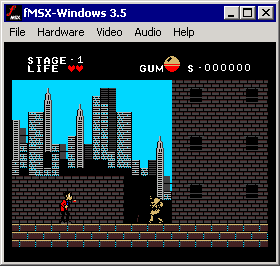
Nueva versión de este gran emulador de MSX creado por Marat Fayzullin que permite el uso de ordenadores MSX, MSX2, and MSX2+,con gran compatibilidad en los juegos, uso de trucos y filtros gráficos para mejorar la imagen, también existe para Android en dos versiones gratis y una completa de pago.
Cambios en la nueva versión:
- Añadido special effects simulating individual pixel components.
* Añadidos EPX y EAGLE filtros ebimage scaling .
* Incluidas las opciones de scanline en "Simulate Scanlines" en fMSX-Windows.
* Incluidas las opciones de scaling en "Interpolate Video" en fMSX-Windows.
* Añadida ña opción "Clear File Associations" eb fMSX-Windows.
* Añadida la opción "Play Sound When Inactive" en fMSX-Windows.
* Añadido "Apply Color Raster" submenu en fMSX-Windows.
* Añadido -rgb y -cmy command line opciones.
* Añadido -epx y -eagle command line opciones.
Página oficial:
http://fms.komkon.org/fMSX/
Descarga de su página oficial la versión de Windows:
http://fms.komkon.org/fMSX/fMSX44-Windows-bin.zip
Descarga de su página oficial la versión de Linux:
http://fms.komkon.org/fMSX/fMSX44-Ubuntu-x86-bin.tgz
Android gratis:
https://play.google.com/store/apps/details?id=com.fms.fmsx
Andoid completa por 2.99 EUR :
https://play.google.com/store/apps/details?id=com.fms.fmsx.deluxe
Cambios en la nueva versión:
- Añadido special effects simulating individual pixel components.
* Añadidos EPX y EAGLE filtros ebimage scaling .
* Incluidas las opciones de scanline en "Simulate Scanlines" en fMSX-Windows.
* Incluidas las opciones de scaling en "Interpolate Video" en fMSX-Windows.
* Añadida ña opción "Clear File Associations" eb fMSX-Windows.
* Añadida la opción "Play Sound When Inactive" en fMSX-Windows.
* Añadido "Apply Color Raster" submenu en fMSX-Windows.
* Añadido -rgb y -cmy command line opciones.
* Añadido -epx y -eagle command line opciones.
Página oficial:
http://fms.komkon.org/fMSX/
Descarga de su página oficial la versión de Windows:
http://fms.komkon.org/fMSX/fMSX44-Windows-bin.zip
Descarga de su página oficial la versión de Linux:
http://fms.komkon.org/fMSX/fMSX44-Ubuntu-x86-bin.tgz
Android gratis:
https://play.google.com/store/apps/details?id=com.fms.fmsx
Andoid completa por 2.99 EUR :
https://play.google.com/store/apps/details?id=com.fms.fmsx.deluxe
Suscribirse a:
Entradas (Atom)


